
90JILI Login: Username, Google & Telegram Sign-In
At 90JILI, the login option that works is the one that matches how the account was created: a username and password, or one-click Google or Telegram. This 90JILI login guide walks through each route, explains why the login password and the transaction password are two different things, and covers what to do when a password is forgotten or a sign-in is refused. It is written for members aged 21+ who already have an account. The steps come first, and the fixes follow.
How to Log In at 90JILI with a Username, Google or Telegram
Members log in at 90JILI by entering a username (or a linked mobile number) and a password, or by tapping the one-click Google or Telegram option on the login screen.
- Open the official 90-jili.ph website, by typing the address or from a bookmark you saved earlier.
- Tap Log in.
- Enter your username (or the mobile number linked to the account) and your password. To use one-click sign-in instead, tap the Google or Telegram option.
- If you turned on Google Authenticator, enter the code from the app when it is requested.
- Once your details are accepted, the account opens and you can continue where you left off.
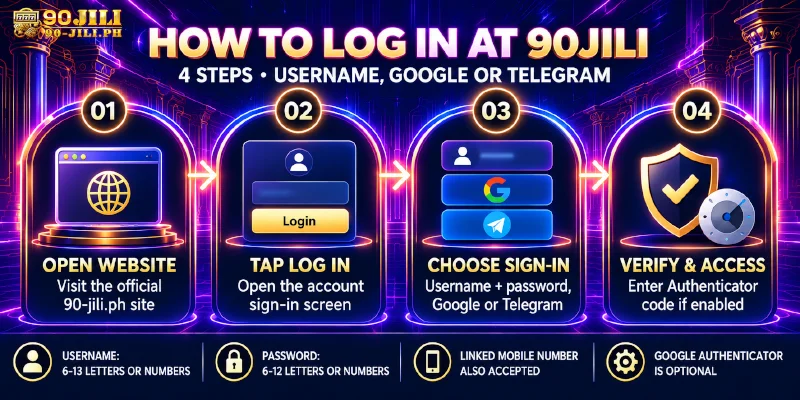
Registration accepts usernames of 6–13 letters and numbers and passwords of 6–12 letters and numbers, so an entry outside those lengths is a typing slip to correct before anything else. If the account was created with Google, the Google button is the one to try first. Saving the address of the 90JILI online casino as a bookmark means every later login starts from the real site.
90JILI Login on Mobile: Browser or the 90JILI App
Members can sign in from a phone through the mobile browser or through the app, and both routes start from the official site.
In a mobile browser, open the official site and follow the same steps as above. The 90JILI app is installed by scanning the QR code shown on the official site, so the download begins from the real site rather than from a link of unknown origin. Members who prefer not to install anything can keep playing in the browser.
Login Password vs Transaction Password: What Each One Does
90JILI uses two separate passwords: the login password opens the account, and the transaction (fund) password is entered with every withdrawal.
The transaction password is set inside the withdrawal flow, when a payout wallet is added, so it belongs to the cash-out process and not to the login screen. A member who only plays can log in for a long time without meeting it, and a login that works says nothing about whether the transaction password is remembered.
- Login password: 6–12 letters and numbers, entered on the login screen.
- Transaction password: entered on every withdrawal request.
- Choose different passwords for the two and store both somewhere only you can reach, ideally right after registering.
Forgot Your 90JILI Password? Reset It by SMS or Customer Service
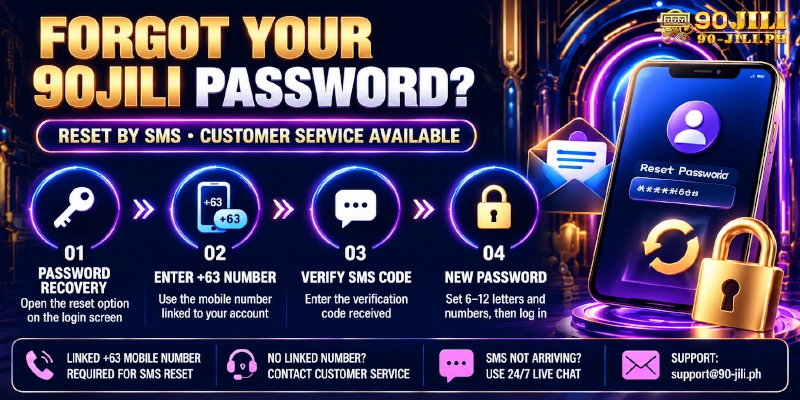
A forgotten password at 90JILI can be reset with a +63 mobile number and an SMS code, or by asking customer service.
- On the login screen, choose the password recovery option.
- Enter the +63 mobile number linked to the account.
- Enter the SMS code that arrives on that number.
- Set a new password of 6–12 letters and numbers, then log in with it.
Registration asks only for a username and password, so some members may not have a mobile number on the account, and an SMS code cannot reach a number that was never added. For those accounts, and whenever the SMS does not arrive, 24/7 live chat or [email protected] is the route. Have your username ready when you write in.
90JILI Login Problems and Quick Fixes
Most refused sign-ins trace back to one of the causes below, and each has a short fix.
| Problem | Likely cause | Fix |
|---|---|---|
| Username or password refused | A typing slip, or an entry outside 6–13 / 6–12 letters and numbers | Retype carefully; if it is still refused, use the SMS reset |
| Google or Telegram sign-in does not open the account | A different sign-in method from the one used to create the account | Try the Google option first if you signed up with Google; otherwise contact live chat |
| SMS code does not arrive | The number entered is not the one linked to the account | Re-enter the linked +63 number; if it still fails, contact customer service |
| No mobile number on the account | The account was registered with a username and password only | Contact customer service for the reset |
| Page looks different or asks for unusual details | A lookalike site, not the official 90JILI site | Close it and reach the site from your saved bookmark or by typing 90-jili.ph |
| Withdrawal asks for another password | The transaction password is separate from the login password | Enter the transaction password set in the withdrawal flow |
If none of these fits, 24/7 live chat or [email protected] can look at the account, so keep your username at hand.
Keeping Your 90JILI Account Secure After You Log In
Logging in is where account protection starts, and 90JILI gives members several controls to use from there.
- Google Authenticator: an optional extra check. Members who enable it enter the app code when they log in.
- 128-bit SSL: the connection is encrypted after login.
- Separate fund password: withdrawals need a different password from the one used to log in.
- One account per player: one payout account belongs to one member and sharing is not allowed, so login details are best kept private as well.
Frequently Asked Questions
Quick answers on phone-number login, Google and Telegram, the Authenticator code and the two passwords.
Can I log in to 90JILI with my mobile number?
Yes. The login screen accepts a username or a phone number together with the password. A mobile number works when it is linked to the account, and members who registered with only a username and password sign in with the username.
Can I log in with Google or Telegram?
Yes. One-click Google and Telegram login are available alongside the username option. Google is also a one-click registration option, so members who signed up with it should try the Google button first.
Is the Google Authenticator code compulsory?
No. Google Authenticator is optional. Members who switch it on enter the code from the app when they log in, and members who leave it off sign in with their usual details.
Why does a withdrawal ask for a different password?
The transaction password is separate from the login password. It is set in the withdrawal flow and is required on every withdrawal request, so a successful login does not replace it.
What if I forgot my username?
The recovery options above cover passwords. A forgotten username is a question for customer service, so contact 24/7 live chat or [email protected] and ask which account details to provide.
Can I open a new account if I cannot log in?
No. 90JILI allows one account per person, so recovering the existing account through customer service is the right route.
Three Things to Have Ready Before You Log In at 90JILI
Before the next login, check three things: which button matches how the account was created, where the login password and the transaction password are stored, and how to reach customer service if a reset is needed. Members who do not have an account yet can register with a username and password or with Google.