
90JILI Deposit: GCash, Maya, GoTyme & USDT from ₱100
At 90JILI, members can deposit from ₱100 with GCash, Maya, GoTyme or USDT, and a deposit is usually credited within 5 minutes. This guide covers how to select a payment method, choose a channel, enter the amount and tap Apply for Deposit, then finish the payment in your e-wallet. It also lists the limits for each method, explains the promotion choice on the deposit screen, and shows what to do if a deposit is not credited. Everything here is for members of the 90JILI online casino aged 21 and above, and the limits and channels were checked in October 2026.
90JILI deposit methods, channel limits and credit time
The 90JILI deposit page offers four methods, and each one has its own channel minimums and maximums.
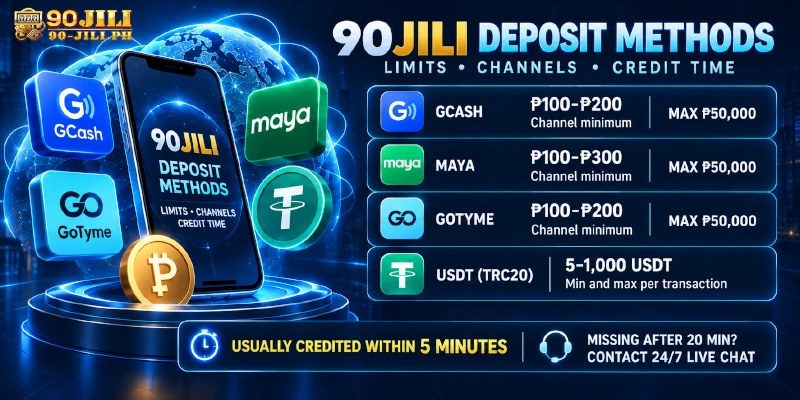
| Method | Channel minimum | Maximum per transaction |
|---|---|---|
| GCash | ₱100 to ₱200, depending on channel | ₱50,000 |
| Maya | ₱100 to ₱300, depending on channel | ₱50,000 |
| GoTyme | ₱100 to ₱200, depending on channel | ₱50,000 |
| USDT (TRC20) | 5 USDT | 1,000 USDT |
The lowest minimum across all channels is ₱100, but some channels start at ₱200 or ₱300, so read the limit shown under the channel before you type an amount. A deposit below the channel minimum will not go through, which is the most common reason a small first deposit fails. Channel lists and limits can change over time, and the deposit page always shows the current ones.
A deposit is usually credited within 5 minutes. If it has not arrived after 20 minutes, contact customer service through 24/7 live chat.
How to deposit at 90JILI with GCash, Maya or GoTyme: step by step
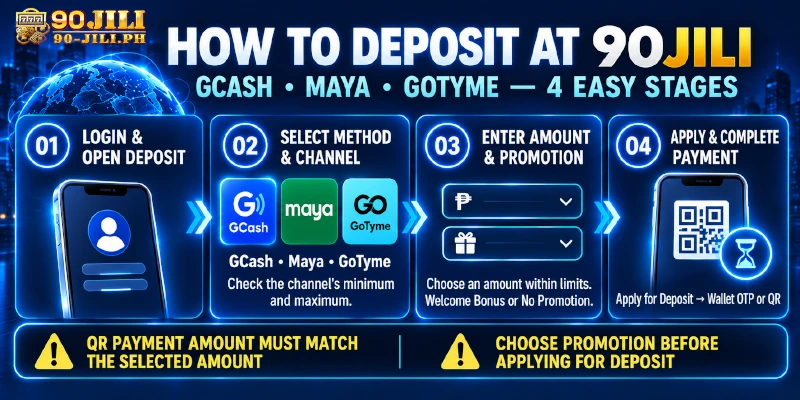
To deposit with an e-wallet, open the Deposit page, pick the method and channel, choose your amount and promotion, then confirm the payment in the wallet app.
- Open the official 90JILI site and log in to your account.
- Go to the Deposit page.
- Select GCash, Maya or GoTyme as the payment method.
- Choose a channel. Each channel shows its own minimum and maximum.
- Pick one of the preset amounts or enter your own, staying inside the channel limits.
- Choose a promotion, or select “Do Not Participate In Any Promotions”.
- Tap Apply for Deposit, then complete the payment in your e-wallet. Depending on the channel, this means a redirect to the wallet with an OTP, or a QR code to scan.
The promotion choice comes before the payment on purpose: once you tap Apply for Deposit, the deposit is already on its way, so decide about the Welcome Bonus first. On QR channels, the amount you transfer must match the amount you selected. If it differs, the deposit will not be credited automatically, so check the figure in your wallet before confirming. If you did transfer a different amount, contact customer service with a screenshot of the payment.
Depositing with USDT (TRC20): range and conversion
USDT deposits at 90JILI use the same flow as above up to the payment: select USDT, choose the USDT-TRC20 channel and enter an amount from 5 to 1,000 USDT. The amount is converted into pesos at the rate shown on the deposit page at the time you deposit, so check that rate before you confirm instead of relying on a figure from elsewhere.
Because the USDT limit is set in USDT rather than pesos, the peso value of a maximum deposit depends on the displayed rate. Follow the on-screen payment instructions after you apply for the deposit, and ask customer service if anything on that screen is unclear.
Choosing a promotion at the deposit screen: Welcome Bonus or none
The promotion step lets new members take the Welcome Bonus, and every member can skip promotions entirely.
The Welcome Bonus is 120% across your first three deposits, at 30% on the first, 40% on the second and 50% on the third, with a minimum deposit of ₱100 and a maximum bonus of ₱500. For example, a first deposit of ₱1,000 earns a 30% bonus of ₱300. The bonus applies to slot games from JILI, PG and FC only, requires a verified mobile number, and cannot be combined with other promotions.
The wagering requirement is x5, x7 and x10 on the promotion page, so confirm the multiplier on the deposit screen before you apply. To claim it, select the channel and then choose “Welcome Bonus” in the promotion step. The full terms are on the Welcome Bonus page.
Because turnover counts only valid slot bets, members who mainly play fish, live casino or card games may prefer “Do Not Participate In Any Promotions” so no turnover applies to their deposit. Mobile number verification is only needed for the Welcome Bonus. If you are not sure how to verify your number, ask customer service.
Deposit not credited at 90JILI? Causes and fixes
Most 90JILI deposits arrive within minutes, so this table helps you tell a normal wait from a problem.
| Issue | Likely cause | What to do |
|---|---|---|
| Not credited after a few minutes | Still within the usual window of about 5 minutes | Wait, then check your transaction history, which shows the last 30 days |
| QR payment sent but not credited | The amount transferred did not match the selected amount | Contact customer service with a payment screenshot |
| Still missing after 20 minutes | Needs a check by customer service | Open 24/7 live chat |
| Welcome Bonus not showing | The bonus was not chosen in the promotion step, or the mobile number is not verified | Check both, then ask customer service |
When you contact live chat, have your username, the method and channel, the amount and a screenshot of the payment ready. That lets customer service look up the deposit without back and forth. You can also reach support at [email protected].
After you deposit: what to know before you cash out
At 90JILI, deposit limits and withdrawal limits are different, so plan the amount you put in with the payout rules in mind. A single deposit can be up to ₱50,000 on e-wallet channels, while a withdrawal is ₱200 to ₱10,000 per request and up to ₱50,000 per day. A large deposit therefore cannot come back out in one request.
There is no withdrawal fee, and withdrawals are available 24 hours. Before a payout, any active turnover must be met, and bonus balance cannot be withdrawn while a bonus is active. Withdrawals also use a transaction password, which you set in the withdrawal flow and keep separate from your login password. The steps and payout limits are explained in the withdrawal guide.
Frequently Asked Questions
These short answers cover credit time, limits, methods, promotions, USDT and deposit history.
How long does a 90JILI deposit take to appear?
A deposit is usually credited within 5 minutes. If it has not appeared after 20 minutes, contact customer service through 24/7 live chat.
What is the minimum and maximum deposit at 90JILI?
The lowest channels start at ₱100, and some channels start at ₱200 or ₱300. E-wallet channels accept up to ₱50,000 per transaction, and USDT accepts 5 to 1,000 USDT.
Which deposit methods does 90JILI accept?
At 90JILI, members can deposit with GCash, Maya, GoTyme and USDT (TRC20). The channel list can change, so check the deposit page for the current options.
Do I have to pick a promotion when I deposit?
No. The promotion step lets you choose “Do Not Participate In Any Promotions” and deposit without any bonus or turnover attached.
Is USDT converted to pesos when I deposit?
Yes. The USDT amount is converted at the rate shown at the time of the deposit, so check that rate before confirming.
How far back can I see my deposit history?
Your 90JILI transaction history can be viewed for 30 days, so save any screenshots you may need for older deposits.
Deposit smoothly: match the channel, the amount and the promotion
A trouble-free deposit at 90JILI comes down to three matches. The amount should fit the channel limits, the QR transfer should equal the selected amount, and the promotion should be chosen before you apply for the deposit. Keep a payment screenshot and your transaction history to hand, and if a deposit has not arrived after 20 minutes, live chat is open 24/7. Members who are new to the site can start the Welcome Bonus with their first deposit, and everyone else can deposit with no promotion at all.