
90JILI App Download: Scan the QR Code for Android & iOS
The 90JILI app comes from one place: the QR code on the official 90JILI site. Members of this online casino aged 21+ scan the code with a phone camera, follow the install prompt, then log in or register to play on mobile. Prefer not to install anything? The site also runs in a mobile browser. This guide covers the scan steps, the checks to make before you download, and what to do if the QR code or the install stalls.
How to Download the 90JILI App by Scanning the QR Code
To download the 90JILI app, scan the QR code on the official site with your phone and follow the install prompt that appears. This is the only app route published, so every step starts from the official site.
- Open the official 90JILI site at 90-jili.ph and find the QR code for the app.
- Scan the QR code with your phone camera.
- Follow the install prompt shown on your screen until the app is on your phone.
- Open the app, then log in with your existing account or register a new one.
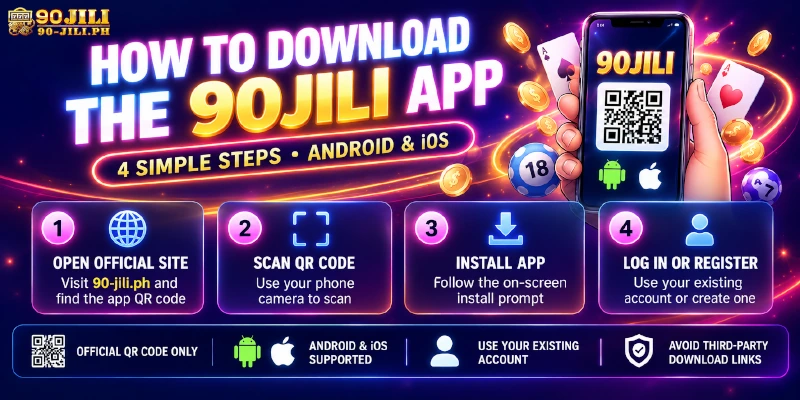
Starting from the official site matters because the QR code there is the published route. A download link or file sent by someone else is not part of the process, so if you received one, ignore it and begin again from step 1.
Official Site Only: Safety Checks Before You Download the 90JILI App
Before you scan or install anything, run through these four checks. Each one is about where the download comes from, which is the part members control.
- Type 90-jili.ph yourself or use your own bookmark instead of tapping a link in a message.
- Remember that sites with similar names exist. Only the QR code on the official site is the app route described in this guide.
- Use only the official online customer service for help. support is provided through that channel only, so an app file or “support” offered anywhere else is not official.
- Never share your login password or transaction password with anyone, including in a chat.
The reason is simple: a page that copies the look of a casino app will ask for your username and password, and entering them hands the account to whoever built the page. These checks tell you where an install came from. They do not replace keeping your passwords private.
Once you are in, accounts have protections of their own: optional Google Authenticator, a separate fund password that is required on every withdrawal, and 128-bit SSL encryption after login. Members who turn on the Authenticator and keep both passwords different add a layer that does not depend on the phone.
90JILI App for Android and iPhone: One QR Code Route for Both
According to the site FAQ, the app is available for Android and iOS, and the QR code is the route for both. The phone requirements, such as the lowest Android or iOS version, are not published, so there is no version number to check against.
If the install prompt does not appear on your phone, ask live chat for help and have your phone model and operating system version ready. That gives support what it needs to look at your case.
Play 90JILI in Your Mobile Browser Without Installing the App
Members who would rather not install anything can play in a mobile browser instead. This suits anyone who wants to register and look around first, and the app can be added later without changing the account.
Registration needs only a username of 6 to 13 letters or numbers and a password of 6 to 12 letters or numbers, or one-click Google sign-up. A mobile number is not required to register. It is needed later, for example to verify the account before claiming the Welcome Bonus, so it helps to know that before you start.
After Installing: Log In or Register Without Creating a Second Account
Members who already have an account log in with the same details they use on the site: a username or mobile number plus password, or one-click Google or Telegram.
New members register with a username and password, or with Google. Saving the username and password right after registration saves a password reset later.
The one rule to keep in mind is one account per person. The same IP address, bank account or contact number cannot be shared across accounts, and multiple or fake accounts are disqualified. A member who registered in the browser and then installs the app is therefore logging in to the existing account, not registering again.
App Not Installing or the QR Code Not Scanning? Checks and Fixes
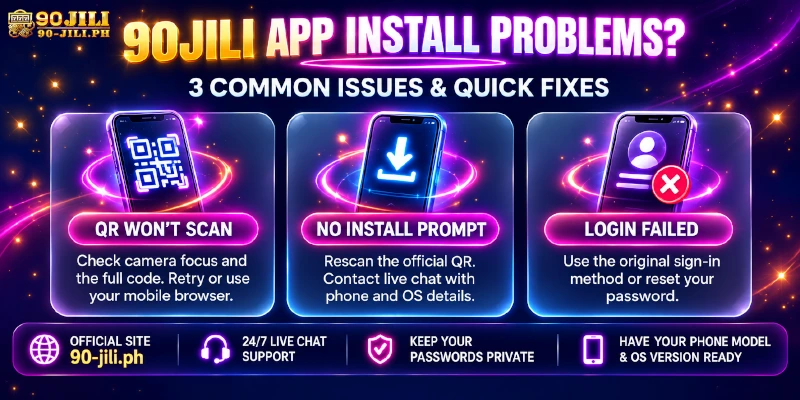
Most install problems come down to a handful of checks. The table lists what to look at first and what to do next.
| Issue | What to check | What to do |
|---|---|---|
| QR code will not scan | The camera is focused and the whole code is in view; the code is the one shown on the official site | Try again. If it still fails, play in the mobile browser meanwhile and ask live chat |
| No install prompt after scanning | You scanned the code from the official site and finished the prompts | Scan again. If nothing appears, contact live chat with your phone model, OS version and a screenshot |
| App opens but login fails | You are signing in the way the account was created: username, Google or Telegram | Reset the password with the +63 mobile number and an SMS code, or ask customer service |
| Not sure the page is official | Where you came from and the address you are on | Close it, enter nothing, and go back to 90-jili.ph |
For anything the table does not cover, customer service is on live chat 24/7. Send your username, phone model, operating system version and a screenshot of what you see.
Frequently Asked Questions
These short answers cover app listings, accounts, browser play, phone support, age and help.
Is there a 90JILI app listing in an app store?
The method 90JILI publishes for getting the app is the QR code on the official site. Follow that route instead of looking for a listing elsewhere.
Do I need a new account for the 90JILI app?
No. The rule is one account per person, so log in to your existing account in the app.
Can I play 90JILI without downloading the app?
Yes. The site works in a mobile browser, so installing the app is optional.
Which phones does the 90JILI app support?
The site FAQ says the app is for Android and iOS. Minimum versions are not published, so ask live chat if your phone does not show the install prompt.
Who can use the 90JILI app?
Members aged 21 and over. The same age rule applies to the app, the browser and every other part of the site.
Who do I contact if the app has a problem?
Use 24/7 live chat, or email [email protected]. Include your username, phone model, operating system version and a screenshot.
Download From the Official Site and Keep One Account
Getting the app comes down to one QR code on the official site and the install prompt that follows. Check where the download came from, keep your login and transaction passwords separate, and use the same account whether you play in the app or the mobile browser. If something stalls, live chat is open around the clock.